Resource Types
Experience Builder organizes content and functionality into different resource types. Each resource type serves a specific purpose in building and managing websites. Understanding these resource types is essential for effectively structuring your Experience Builder projects.
Overview
Resource types categorize files and content based on their function and format. Each resource type has specific file extensions, content structures, and use cases within the Experience Builder system.
Resource Type Reference
| Name | Description | File Extensions |
|---|---|---|
| Layouts | Liquid templates that define the overall page structure and HTML wrapper. | layout |
| Pages | JSON files that define page routes, metadata, and component/widget composition. | page, ctxpage |
| Components | Liquid resources with structures that create modular, customizable content blocks. | component |
| Snippets | Reusable Liquid code fragments that can be included in other templates. | snippet |
| Assets | Static files including CSS, JavaScript, and Liquid-processed styles/scripts. | css, js, liquidcss, liquidjs |
| Locales | JSON files containing translation keys and values for internationalization. | locale, ctxlocale |
| Widgets | JSON files that organize and configure component instances on pages. | widget, ctxwidget |
| Media | Binary files including images, videos, audio, and fonts stored in DAM. | jpg, png, svg, gif, avif, ico, mp4, webm, woff, woff2, ttf, eot, media, ctxmedia |
| Datas | JSON files containing configuration values referenced by components and pages. | setting, ctxsetting, schema |
Layouts
Layouts are Liquid template files that define the overall HTML structure for pages. They serve as the wrapper that contains page content and typically include the <html>, <head>, and <body> tags.
Functionality
- Define the base HTML structure for pages
- Include common elements like meta tags, stylesheets, and scripts
- Provide placeholders for page content rendering
- Support Liquid template syntax for dynamic content
File Format
Layouts use the .layout extension and contain Liquid template code with HTML.
Example: default.layout
<html lang="en">
    <head>
        <title>{{ page.title }}</title>
        {% renderinline styles %}
    </head>
    <body>
        {% renderbody %}
        {% renderinline scripts %}
    </body>
</html>
Pages
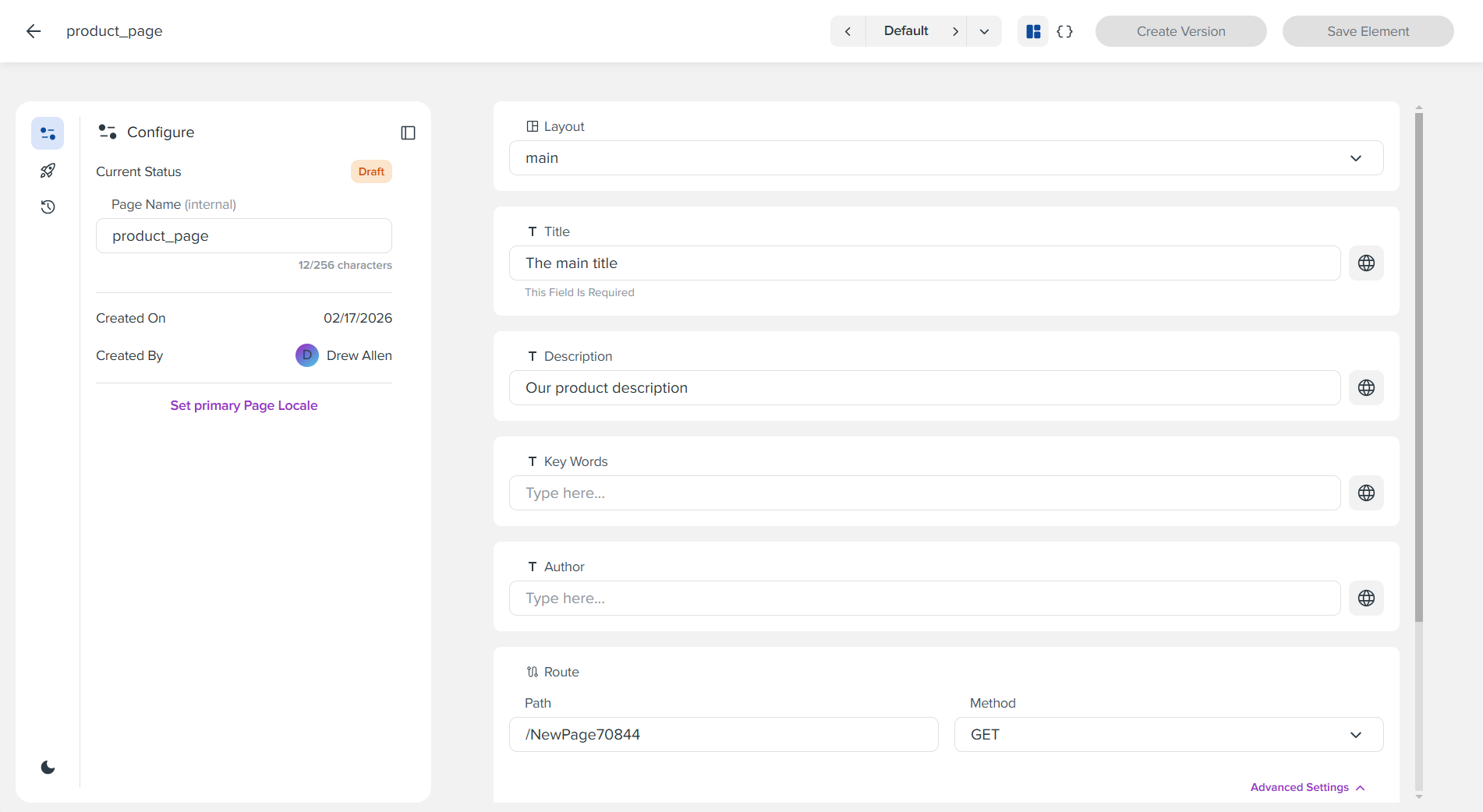
Pages are JSON files that define individual web pages, including their routes, metadata, and the components/widgets they contain.
Functionality
- Define page routes and HTTP methods (GET, POST)
- Specify layout assignment
- Configure page metadata (title, description, keywords, author)
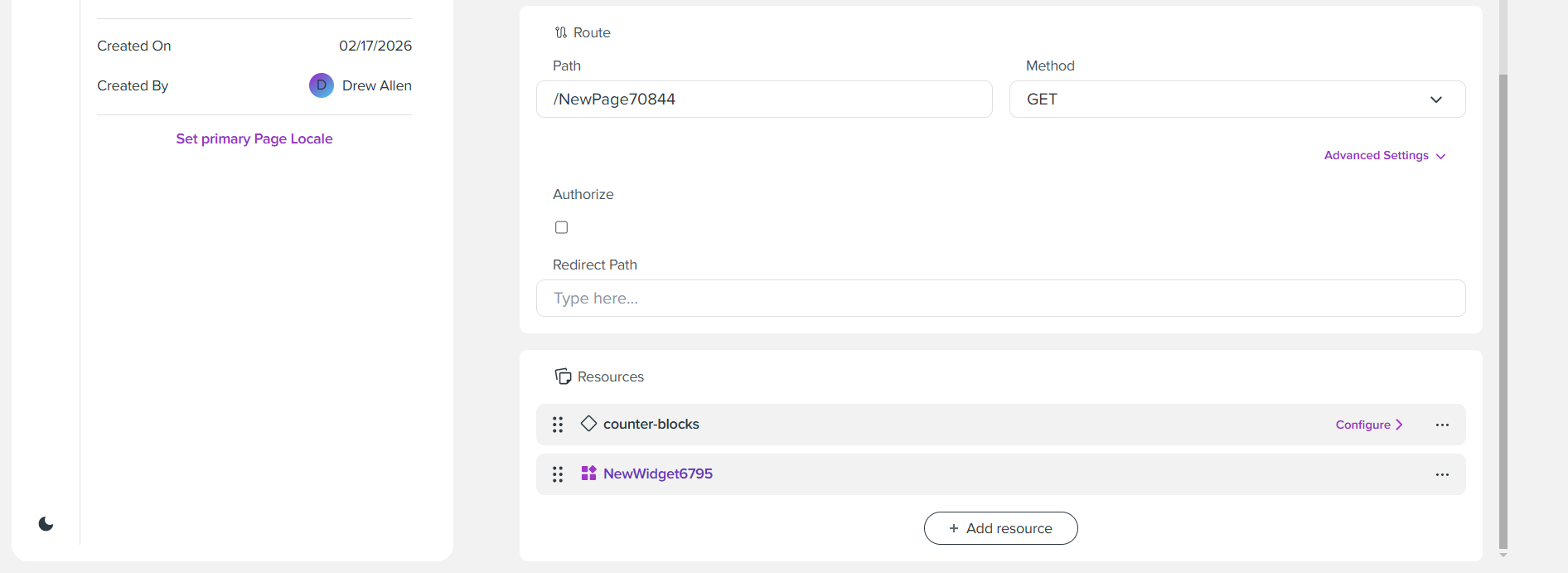
- Organize components and widgets on the page
- Define API data fetching through metaObjects
Page Attributes
| Attributes | Type | Required | Description | Default |
|---|---|---|---|---|
layout |
String/Boolean | No | Filename of the layout to use, or false for no layout. |
- |
title |
String | No | Page title for SEO and browser display. | - |
description |
String | No | Meta description for SEO. | - |
keyWords |
String | No | Meta keywords for SEO. | - |
author |
String | No | Page author information. | - |
route |
Object | No | Routing configuration including path, method, and metaObjects. | - |
widgets |
Array(String) | No | Array of widget filenames to include on the page. | - |
components |
Object | No | Object mapping component instance IDs to component configurations. | - |
order |
Array(String) | No | Array defining the order of widgets and components on the page. | - |
Route Attributes
| Attributes | Type | Required | Description | Default |
|---|---|---|---|---|
path |
String | Yes | URL path pattern for the route. | - |
method |
String | No | HTTP method (GET, POST, etc.). | GET |
authorize |
Boolean | No | When true, requires user authentication before accessing the page. Unauthorized users are redirected or blocked. |
false |
redirectPath |
String | No | URL path to redirect users to when accessing this route. If set, users are redirected instead of rendering the page. Leave empty to render normally. | - |
metaObjects |
Array(Object) | No | Array of meta objects for API data fetching. | - |
Example: product_page.page
{
  "route": {
    "path": "/NewPage70844",
    "method": "GET",
    "authorize": false,
    "redirectPath": ""
  },
  "layout": "layouts/main",
  "title": "The main title",
  "description": "Our product description",
  "keyWords": "",
  "author": "",
  "order": [
    "IoUHo31wJv3xFjxX",
    "Assets/NewWidget6795"
  ],
  "widgets": [
    "Assets/NewWidget6795"
  ],
  "components": {
    "IoUHo31wJv3xFjxX": {
      "id": "block-samples/counter-blocks",
      "displayName": "",
      "blockOrder": []
    }
  }
}
Components
Components are Liquid resources that enable the creation of modular and customizable content. A JSON definition, placed within Liquid structure tags at the bottom of each component, specifies the customizable behavior of the component. The component structure can also instruct the pre-render phase of the request life cycle to fetch data from the API SDK.
See Components for detailed documentation.
Snippets
Snippets are reusable Liquid code fragments that can be included in other templates using the {% render %} or {% include %} tags. They help reduce code duplication and maintain consistency across templates.
Functionality
- Create reusable Liquid code blocks
- Accept parameters for customization
- Reduce code duplication across templates
- Maintain consistent UI patterns
File Format
Snippets use the .snippet extension and contain Liquid template code.
Example: button.snippet
Usage in Component:
Assets
Assets are static files including CSS stylesheets, JavaScript files, and Liquid-processed versions of these files. They provide styling and functionality to your website.
Functionality
- Provide CSS styling for components and pages
- Include JavaScript functionality
- Support Liquid processing for dynamic asset generation
- Organize styles and scripts by feature or purpose
File Types
| Extension | Description | Content Type |
|---|---|---|
css |
Standard CSS stylesheet | text/css |
js |
Standard JavaScript file | text/javascript |
liquidcss |
CSS file with Liquid template syntax | text/css |
liquidjs |
JavaScript file with Liquid syntax | text/javascript |
Example: styles.css
.button-primary {
    background-color: var(--color-primary);
    color: var(--color-text-light);
    padding: 0.75rem 1.5rem;
}
Example: script.liquidjs
document.addEventListener('DOMContentLoaded', function() {
    const button = document.querySelector('[data-action="submit"]');
    if (button) {
        button.addEventListener('click', function() {
            // Dynamic functionality using {{ page.title }} or other Liquid variables
            console.log('Page: {{ page.title }}');
        });
    }
});
Locales
Locales are JSON files containing translation keys and values for internationalization. They enable multi-language support by organizing translations into hierarchical structures.
Functionality
- Store translation strings for multiple languages
- Organize translations into categories and groups
- Support context-aware translations
- Enable market-specific localization
File Format
Locales use the .locale extension (standard) or .ctxlocale extension (context-aware) and contain JSON with a hierarchical structure.
Example: examplelocale.en
{
  "culture": "en",
  "locale": {
    "sections": {
      "examplelocale": {
        "greeting": "hello"
      },
      "second_section": {
        "exit": "goodbye"
      }
    }
  }
}
Example: examplelocale.en.my (Context Locale)
{
  "locale": {
    "sections": {
      "examplelocale": {
        "greeting": "hey there!"
      }
    }
  },
  "parent": "wikiexamples/examplelocale.en",
  "context": {
    "markets": ["my"]
  }
}
Locale Structure
| Attributes | Type | Required | Description | Default |
|---|---|---|---|---|
culture |
String | Yes | Culture code (e.g., "en", "es"). | - |
locale |
Object | Yes | Hierarchical object containing translation keys and values. | - |
Widgets
Widgets are JSON files that organize and configure component instances. They act as containers that can be reused across multiple pages, providing a way to group related components together.
Functionality
- Organize multiple component instances
- Define component order and configuration
- Create reusable component groups
- Support context-aware widget inheritance
Widget Attributes
| Attributes | Type | Required | Description | Default |
|---|---|---|---|---|
widgets |
Array(String) | No | Array of widget filenames to include (for widget composition). | - |
components |
Object | No | Object mapping component instance IDs to component configurations. | - |
order |
Array(String) | No | Array defining the order of components within the widget. | - |
Example: header.widget
{
  "components": {
    "logo-1": {
      "id": "logo.component",
      "enabled": true,
      "settings": {
        "image": "logo.png",
        "alt": "Company Logo"
      }
    },
    "navigation-1": {
      "id": "navigation.component",
      "enabled": true,
      "settings": {
        "menuItems": ["Home", "Products", "About", "Contact"]
      }
    }
  },
  "order": [
    "logo-1",
    "navigation-1"
  ]
}
Example: ctxwidget (Context Widget)
{
  "parent": "@Parent",
  "context": {
    "markets": ["intl"]
  },
  "widget": {
    "components": {
      "localized-header-1": {
        "id": "header.component",
        "enabled": true
      }
    }
  }
}
Media
Media resources are binary files stored in the Digital Asset Management (DAM) system. They include images, videos, audio files, and fonts used throughout your website.
Functionality
- Store and manage binary media files
- Support various image, video, audio, and font formats
- Provide metadata about media assets
- Enable context-aware media selection
Supported Media Types
| Category | Extensions | Description |
|---|---|---|
| Images | jpg, jpeg, png, gif, svg, avif, ico, webp |
Raster and vector images |
| Videos | mp4, webm, avi, mov, flv |
Video files |
| Audio | aac, wav, weba |
Audio files |
| Fonts | woff, woff2, ttf, eot |
Web fonts |
Media JSON Format
Media can also be referenced as JSON files (.media or .ctxmedia) that point to DAM assets.
Example: english_icon.media
{
  "damId": "a7f3b2c1-4d8e-5f9a-6b2c-3d4e5f6a7b8c",
  "title": "english icon",
  "mimeType": "svg",
  "width": "512px",
  "height": "512px"
}
Example: english_icon.pl.media (Context Media)
{
  "parent": "wikiexamples/english_icon",
  "context": {
    "markets": ["pl"]
  },
  "media": {
    "title": "english icon for pages",
    "mimeType": "jpeg"
  }
}
Media Attributes
| Attributes | Type | Required | Description | Default |
|---|---|---|---|---|
damId |
String | Yes | UUID of the media asset in DAM. | - |
title |
String | No | Display title for the media asset. | - |
width |
String | No | Width in pixels (e.g., "1920px"). | - |
height |
String | No | Height in pixels (e.g., "1080px"). | - |
mimeType |
String | No | MIME type of the media file. | - |
Datas
Datas are JSON files containing configuration values that can be referenced by components, pages, and other resources. They provide a centralized way to manage site-wide configuration.
Functionality
- Store site-wide configuration values
- Provide datas that components can reference
- Support hierarchical datas inheritance
- Enable context-aware datas (market-specific, etc.)
Data File Format
Datas use the .setting extension (standard) or .ctxsetting extension (context-aware). Data files reference a structure file (.schema) that defines the structure of available datas.
Example: Ourcompanydata.setting
{
  "schema": "wikiexamples/examplestruct123.schema",
  "settings": {
    "Title": "The title of the year",
    "Type": "A",
    "ColorSample": "#7f2f2f"
  },
  "liquidName": "main name"
}
Example: Ourcompanydata.at.setting (Context Data)
{
  "parent": "wikiexamples/Ourcompanydata",
  "context": {
    "markets": ["at"]
  },
  "settings": {
    "Title": "The title of the year!",
    "Type": "B"
  }
}
Data Structure Format
Data structures (.schema) define the structure and validation rules for data files.
Example: examplestruct123.schema
[
  {
    "type": "text",
    "label": "Main Title",
    "id": "Title"
  },
  {
    "type": "select",
    "label": "Type",
    "id": "Type",
    "options": [
      {
        "value": "A",
        "label": "Option A"
      },
      {
        "value": "B",
        "label": "Option B"
      }
    ]
  },
  {
    "type": "color",
    "label": "Page Color",
    "id": "ColorSample"
  }
]
Data Structure Attributes
| Attributes | Type | Required | Description | Default |
|---|---|---|---|---|
id |
String | Yes | Unique identifier for the datas section. | - |
settings |
Array(Object) | Yes | Array of data definitions. | - |
Data Definition Attributes
| Attributes | Type | Required | Description | Default |
|---|---|---|---|---|
type |
String | Yes | Data type (text, number, color, image, etc.). | - |
id |
String | Yes | Data identifier used to access the value. | - |
label |
String | Yes | Display label for the data. | - |
default |
Any | No | Default value for the data. | null |
schema |
String | No | Reference to another structure for nested datas. | - |
of |
String | No | Type constraint for array datas. | - |
Context-Aware Resources
Several resource types support context-aware versions that enable inheritance and market-specific customization:
- Context Pages (
ctxpage) - Pages that inherit from parent pages with market-specific overrides - Context Locales (
ctxlocale) - Locales that inherit from parent locales - Context Widgets (
ctxwidget) - Widgets that inherit from parent widgets - Context Media (
ctxmedia) - Media selections that vary by context - Context Datas (
ctxsetting) - Datas that inherit from parent datas
Context Attributes
| Attributes | Type | Required | Description | Default |
|---|---|---|---|---|
parent |
String | Yes | Reference to parent resource (typically "@Parent"). | - |
context |
Object | Yes | Context definition (markets, languages, etc.). | - |
Example Context Object:
Best Practices
-
Organize by Feature: Group related resources together in folders (e.g.,
components/hero/,widgets/header/) -
Use Descriptive Names: Name resources clearly to indicate their purpose (e.g.,
product-card.component,main-navigation.widget) -
Leverage Context Resources: Use context-aware resources for market-specific or language-specific customizations
-
Reuse Snippets: Create snippets for commonly used UI patterns to maintain consistency
-
Centralize Datas: Use data files for values that need to be changed across multiple components
-
Optimize Assets: Keep CSS and JavaScript files focused and organized by functionality
-
Structure Locales: Organize locale files hierarchically to match your application's structure